
Customers hate waiting. They also do not like saving a new phone number just to ask a single question about your product. If a buyer has to copy your number, open their phonebook, save the contact, and refresh their WhatsApp list, you will lose that customer.
WhatsApp Direct Chat Link & QR Generator
Create direct wa.me click-to-chat links with pre-filled custom messages and scannable QR codes instantly.
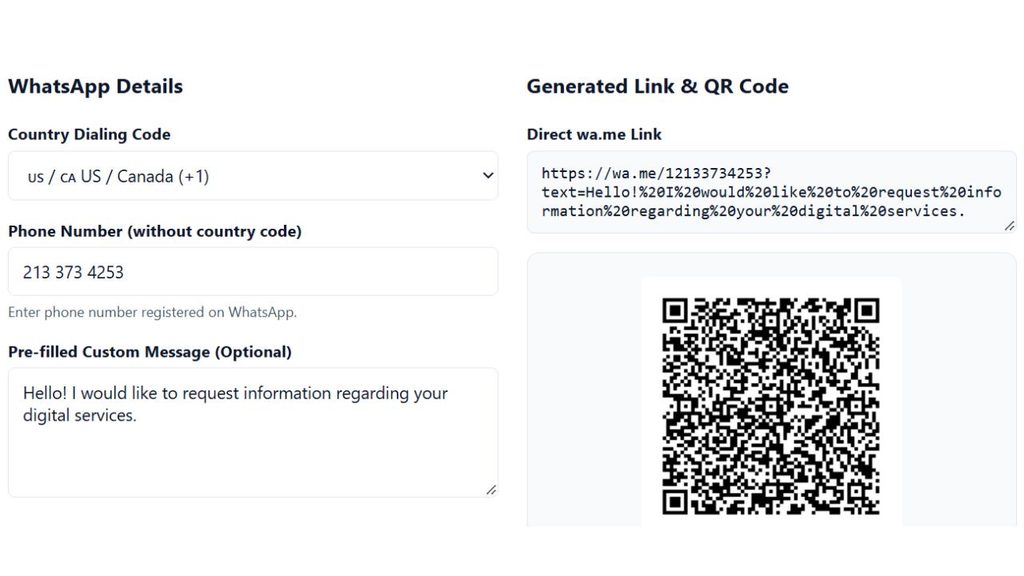
WhatsApp Details
Generated Link & QR Code
That is why we created the WhatsApp Link Generator WP tool. This free online tool helps you turn your mobile number into a direct clickable link. With just one click, your website visitors can start a chat with you on WhatsApp right away.
Why I Built This WhatsApp Link Generator WP Tool (My Experience)
When I started building and managing WordPress websites and online stores, I noticed a big problem. Many visitors came to the site, looked at the products, and left without buying.
First, I put my plain phone number in the website header. Almost nobody messaged me. Next, I installed heavy WordPress chat plugins. Those plugins looked nice, but they slowed down my website speed and hurt my Google rankings.
Then, I tested a simple WhatsApp link to message button using a custom URL. The results were amazing. Customer messages increased in just one week because people could reach me with a single tap. However, typing the manual code and fixing the %20 text spaces every time was annoying and caused errors.
So, I built this WhatsApp link generator WP tool for myself and other website owners. It is super fast, 100% free, and creates both a clean link and a scan-ready QR code in seconds. You do not need any coding skills or heavy plugins anymore.
How to Use Our WhatsApp Link Generator With Message
Creating your custom chat URL takes less than 30 seconds. Follow these simple steps:
- Select Your Country Code: Choose your country code from the list (for example, +92 for Pakistan, +1 for the USA, or +44 for the UK).
- Enter Your WhatsApp Number: Type your active phone number. Do not add zeros, brackets, or dashes at the start.
- Write a Custom Message (Optional): Type a greeting in the message box. When a user clicks your link, this text will automatically appear in their chat bar.
- Click Generate: Press the button to create your https wa me WhatsApp number link and custom QR code.
- Copy or Download: Copy your link or download the WhatsApp link generator QR code image to use anywhere.

Manual Method vs. Our Automatic Tool
Many people try to make an https wa me WhatsApp number link manually. Here is why using a generator is much better:
| Feature | Manual Coding (wa.me) | Our WhatsApp Link Generator WP |
| Ease of Use | Hard. You must type %20 for every space. | Easy. Just type normal text. |
| Error Risk | High. One wrong symbol breaks the link. | Zero. The tool formats everything cleanly. |
| Pre-filled Text | Difficult to write long sentences. | Supports full sentences and emojis. |
| QR Code | Not included. | Instant free QR code download. |
| Cost | Free | 100% Free forever. |
Top Benefits of Using a WhatsApp Chat Link
Adding a direct click-to-chat link to your online presence gives you huge benefits:
- No Need to Save Numbers: Customers can message you immediately without adding your number to their phone contacts.
- Faster Customer Support: Answer buyer questions in real time and close sales faster.
- Higher Conversion Rates: Less effort for the customer means more leads and orders for your business.
- Works Everywhere: Your link works smoothly on Android, iPhone, Windows, and WhatsApp Web.
- Keep Your Site Fast: Instead of installing slow plugins on your site, just paste this lightweight link into a button, menu, or image on WordPress.
- Pre-filled Message Tracking: By setting different custom messages for different pages (like “Hi, I want to buy the Blue Shirt”), you know exactly which product the customer is asking about.
How to Create WhatsApp Link for Business (Best Places to Use It)
If you are wondering how to create WhatsApp link for business growth and where to put it, here are the most effective spots:
1. WordPress Websites & WooCommerce Stores
Add your link to a “Chat on WhatsApp” button on your product pages, contact page, or floating footer. It is the smartest way to use a WhatsApp link generator WP strategy without slowing down your theme.
2. Social Media Bios (Instagram, TikTok, Facebook)
Social media platforms only give you one link spot in your bio. Put your WhatsApp link generator with message URL there so followers can turn into paying customers instantly.
3. Offline Marketing with a QR Code
When you generate your link above, our tool also works as a WhatsApp link generator QR code maker. Download the PNG image and print it on:
- Business cards
- Restaurant menus
- Product packaging and boxes
- Shop front banners and flyers
4. Email Signatures & Digital PDFs
Place your link at the bottom of your emails or inside PDF catalogs so clients can reply to you on WhatsApp with one click.
5. Google Business Profile (Google Maps)
Local shops can use our WhatsApp link generator for Google My Business. Just generate your chat URL above and paste it into the “Website” or “Chat” section of your Google Business Profile. When local customers find you on Google Maps, they can message you directly.
Pro Tip: Use a WhatsApp Link Shortener
When you add a long custom message to your link, the final URL becomes very long and full of %20 symbols. It works fine inside a website button, but it looks messy if you paste it directly in an SMS or Facebook post.
To fix this, you can use a WhatsApp link shortener like Bitly, TinyURL, or your own WordPress redirection plugin (like Pretty Links). A short link looks clean, builds trust, and lets you track how many people clicked your link.
If you need a WhatsApp link generator short URL for SMS marketing, simply copy your generated link and shorten it using Bitly or a WordPress redirect plugin.
Why Choose Our Tool Over Postcron WhatsApp Link Generator?
Many digital marketers used to search for the Postcron WhatsApp link generator to make their links. While older tools like Postcron only gave you a basic URL, our modern WhatsApp link generator free tool gives you everything on a single page:
- Instant live preview of your chat box.
- Built-in country code selector so you never make a formatting mistake.
- Automatic WhatsApp link generator QR code creation right next to your link.
- Clean, ad-friendly, and mobile-responsive interface.
High-Converting Pre-Filled Message Examples
Not sure what to write in the custom message box? Copy and paste any of these proven templates into the WhatsApp link generator with message field above:
- For Online Stores: “Hi! I saw a product on your website and I have a quick question before ordering.”
- For Service Agencies: “Hello! I would like to get a free quote for your services.”
- For Real Estate / Booking: “Hi, I am interested in booking an appointment. Please share the available timings.”
- For Customer Support: “Hello Support Team, I need help with my recent order.”
- For Special Discounts: “Hi! Send me the 10% discount code mentioned on your website.”
Frequently Asked Questions (FAQs)
Is this WhatsApp link generator free to use?
Yes, this tool is 100% free. You can create unlimited links and QR codes for personal or business use without signing up.
Do the links expire?
No. Because our tool uses the official https wa me WhatsApp number link API structure, your links will work forever as long as your WhatsApp number is active.
How do I add this link to my WordPress website?
Copy the generated link from our WhatsApp link generator WP tool. Go to your WordPress page editor (Elementor, Gutenberg, or Classic Editor), add a Button or Icon widget, and paste the link into the URL field.
Does this work for both regular WhatsApp and WhatsApp Business?
Yes! The generated link works on both the standard WhatsApp app and the WhatsApp Business app automatically.
Can I see who clicked my WhatsApp link?
WhatsApp does not show link click analytics by default. However, if you use a WhatsApp link shortener or connect the button to Google Analytics on your WordPress site, you can easily track every click.